| Term | Explanation |
|---|---|
| Position | User's position received through HTML5 geolocation interface |
| Location | User's given value for position. Used for finding services near a defined location, e.g. nearest stops or routing. "route start location" |
"Position" is user's current position that is queried through the HTML5 geolocation interface. Position is used to show a marker on the map and to initialize the routing start location.
Note that in this context "Position" is not the same thing as "Location" (see below). User's position will change during a trip but start and stop locations remain the same.
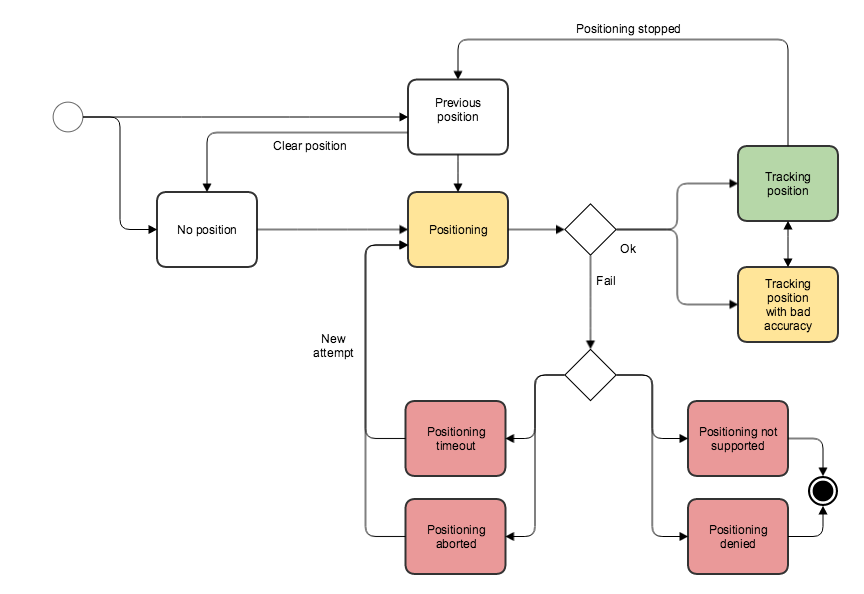
Position state is tracked in PositionContext (app/hooks/PositionContext.jsx) via the status property:
State (POSITION_STATUS constant) |
Description |
|---|---|
no-location (POSITION_STATUS.NO_LOCATION) |
Application has no idea where the user currently is |
searching-location (POSITION_STATUS.SEARCHING_LOCATION) |
Browser is trying to find out the user's geolocation |
prompt (POSITION_STATUS.GEOLOCATION_PROMPT) |
Browser is showing the permission prompt to the user |
found-location (POSITION_STATUS.FOUND_LOCATION) |
User's position is found and is being tracked by the application |
found-address (POSITION_STATUS.FOUND_ADDRESS) |
Position was found and reverse-geocoded to a street address |
geolocation-denied (POSITION_STATUS.GEOLOCATION_DENIED) |
ERROR: User has denied positioning on this page |
geolocation-timeout (POSITION_STATUS.GEOLOCATION_TIMEOUT) |
ERROR: Browser didn't find the user's position within the timeout |
geolocation-watch-timeout (POSITION_STATUS.GEOLOCATION_WATCH_TIMEOUT) |
ERROR: Position tracking (watch) timed out |
geolocation-not-supported (POSITION_STATUS.GEOLOCATION_NOT_SUPPORTED) |
ERROR: Browser does not support HTML5 geolocation or it's unavailable on the device |
Location has two functions. Firstly, it marks the routing start and stop location and possibly a routing via point. Secondly, "from" location can be used for nearby-stop search.
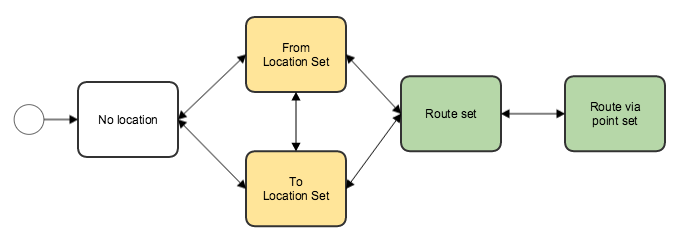
| State | Description |
|---|---|
| No location | We have no location information set |
| From Location set | User's from location is set |
| To Location set | User's to location is set |
| Route set | Both from and to locations are set |
| Route via point set | Both from and to locations are set and also a route via point |