
A painfully simple, lightweight media server for YOUR local network.

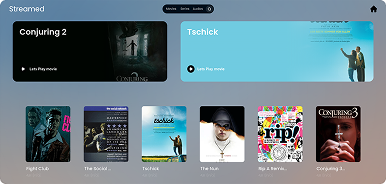
Lets you stream your local video hoard from any web browser: no subscriptions, no 3. party accounts, no nonsense. Just run it, and boom - your questionable anime collection is now wirelessly accessible.
If Plex or Jellyfin feel too bloated for your too, Streamed is the bare-bones alternative you've been looking for.
- 🔒 Privacy first: No Google Sign-In, Email or any online bs, just your local media collection accesible for you
- 🚀 Instant Setup: Ready in < 5 minutes
- 📱 Compatible af: Stream to any device with a modern web browser.
⭐ If you hate bloated software as much as I do, consider dropping a star on this repository! ⭐
The easiest way to get Streamed running on your home server.
1. Clone and enter the project:
git clone https://github.com/8nt0n/streamed.git
cd streamed
2. Start the server:
docker compose up -d --buildThats it - streamed is now up and running on http://localhost:5000/
Access it from your phone/TV on the same network: http://<YOUR_SERVER_IP>:5000
If you want to run it directly via Python on Windows, Mac, or Linux:
git clone https://github.com/8nt0n/streamed.git
cd streamed-flask/

# Setup Virtual Environment
python3 -m venv venv
source venv/bin/activate  # On Windows use: venv\Scripts\activate

# Install & Run
pip install -r requirements.txt
flask run --host=0.0.0.0
- Log in and visit the Index page.
- Click the + Dashboard button at the top.
- Select what you want to upload (Movie, Series, or Audio). Streamed automatically handles the upload, saves it to your persistent storage, refreshes your library in the background, and redirects you back.
Pull requests are highly encouraged!
A note on thanks.py:
What’s it do? Nothing. It just says:
No problem!
Run it after fixing a frustrating bug. It is your emotional support script.
MIT. Do what you want. Just don’t blame me if your server catches fire.