
SwagDoc is a Delphi library to generate the swagger.json (Swagger 2.0) or the openapi.json (OpenAPI 3) file of a REST API. Create a public documentation of your REST API using Swagger 2.0 or OpenAPI 3.2.1 for Delphi Language. SwagDoc's only responsibility is to generate the JSON document. The document is responsible for containing all the documentation for your REST API. This file must be attached to the Swagger UI (User Interface) files.
An API written with Horse publishes that document without writing a single route: the Integrations\Horse folder has a middleware that serves it and renders it with Swagger UI or Scalar. The Integrations\Dext folder does the same for Dext, reading what the application already tells Dext about its endpoints. APIs written with DelphiMVCFramework already use SwagDoc, which the framework bundles in its own tree.

SwagDoc writes the same object model as a Swagger 2.0 document or as an OpenAPI 3 document. The family of the specification is selected by the SpecVersion property of TSwagDoc:
| SpecVersion | Document | File name | Notes |
|---|---|---|---|
svSwagger2 |
"swagger": "2.0" |
swagger.json | Default value. Applications written for the previous releases of SwagDoc keep producing exactly the same document. |
svOpenApi3 |
"openapi": "3.2.1" |
openapi.json | Always writes the latest OpenAPI 3.x release supported by SwagDoc. Schemas follow JSON Schema 2020-12. |
SpecVersion identifies a family of the specification, not a single release. When a new 3.x release of the OpenAPI Specification is supported, svOpenApi3 starts writing it and your code does not change. A new value is only added for a new family (OpenAPI 4) or for a release that is incompatible with the documents already produced by its family. The exact release written in the document is returned by the SwaggerVersion property.
To move an existing application from Swagger 2.0 to OpenAPI 3, read the migration guide: Docs/Migration-Swagger2-to-OpenApi3.md (PDF). The guide is also available in Portuguese (Markdown, PDF) and in Spanish (Markdown, PDF).
| SwagDoc release | svSwagger2 writes |
svOpenApi3 writes |
|---|---|---|
| Current | 2.0 | 3.2.1 |
The library requires only the RTL (package SwagDoc.dpk requires rtl), so it can be used in VCL, FMX, console and server applications.
The main prerequisite for working with SwagDoc is to know the specification of the family you want to publish:
- Swagger 2.0: https://github.com/OAI/OpenAPI-Specification/blob/main/versions/2.0.md and https://swagger.io/docs/specification/2-0/basic-structure/
- OpenAPI 3.2.1: https://github.com/OAI/OpenAPI-Specification/blob/main/versions/3.2.1.md and https://swagger.io/docs/specification/v3_0/basic-structure/
When creating a Swagger documentation for your REST API you can produce a page like the following example.
https://app.swaggerhub.com/apis-docs/swagdoc/sample-api/v1

Add the Source folder to the library path of your project, or install the runtime package Source\SwagDoc.dpk, and use the Swag.Doc unit. The document is described with the object model (info, paths, operations, parameters, responses, definitions and security definitions) and then generated with GenerateSwaggerJson.
uses
  Swag.Common.Types, Swag.Doc, Swag.Doc.Path, Swag.Doc.Path.Operation,
  Swag.Doc.Path.Operation.RequestParameter, Swag.Doc.Path.Operation.Response;

procedure GenerateDocumentation;
var
  vSwagDoc: TSwagDoc;
  vPath: TSwagPath;
  vOperation: TSwagPathOperation;
  vParameter: TSwagRequestParameter;
  vResponse: TSwagResponse;
begin
  vSwagDoc := TSwagDoc.Create;
  try
    vSwagDoc.Info.Title := 'Employee API';
    vSwagDoc.Info.Version := '1.0.0';
    vSwagDoc.Host := 'api.example.com';
    vSwagDoc.BasePath := '/v1';
    vSwagDoc.Schemes := [tpsHttps];
    vSwagDoc.Produces.Add('application/json');

    vPath := TSwagPath.Create;
    vPath.Uri := '/employees/{id}';

    vOperation := TSwagPathOperation.Create;
    vOperation.Operation := ohvGet;
    vOperation.OperationId := 'getEmployee';
    vOperation.Summary := 'Get an employee';

    vParameter := TSwagRequestParameter.Create;
    vParameter.Name := 'id';
    vParameter.InLocation := rpiPath;
    vParameter.Required := True;
    vParameter.TypeParameter := stpInteger;
    vOperation.Parameters.Add(vParameter);

    vResponse := TSwagResponse.Create;
    vResponse.StatusCode := '200';
    vResponse.Description := 'The employee.';
    vResponse.Schema.Name := 'Employee';
    vOperation.Responses.Add(vResponse.StatusCode, vResponse);

    vPath.Operations.Add(vOperation);
    vSwagDoc.Paths.Add(vPath);

    vSwagDoc.SpecVersion := svOpenApi3; // remove this line to generate Swagger 2.0
    vSwagDoc.GenerateSwaggerJson;
    vSwagDoc.SwaggerFilesFolder := 'C:\MyApi\Deploy';
    vSwagDoc.SaveSwaggerJsonToFile; // writes openapi.json for OpenAPI 3 or swagger.json for Swagger 2.0
  finally
    vSwagDoc.Free;
  end;
end;
SwaggerJson holds the generated TJSONValue and SwaggerVersion returns the version string written in the document ("2.0" or "3.2.1"). The name of the file written by SaveSwaggerJsonToFile can be changed with the SwaggerFileName property.
A REST API usually publishes its documentation from the server itself, instead of writing a file to disk. The Integrations folder has one page per framework, with what is needed on each side.
Integrations\Horse is a middleware that publishes the document and the page that renders it. Add the two folders to the search path of the project:
SwagDoc\Source
SwagDoc\Integrations\Horse\Source
One line publishes the documentation, and SwagDocApi is the TSwagDoc of the application, described with the same object model of the rest of this page:
uses
  Horse, Horse.SwagDoc;

begin
  THorse.Use(HorseSwagDoc);

  SwagDocApi.Info.Title := 'Pet Store';
  SwagDocApi.Info.Version := '1.0.0';

  THorse.Get('/pets/:id', GetPet);
  THorse.Listen(9000);
end.
The page is published at /docs and the document at /docs/openapi.json. The Route method documents a route with the syntax used to register it in Horse, translating /pets/:id to /pets/{id} and writing its path parameter:
SwagDocApi.Route('/pets/:id').AddOperation(ohvGet).Summary := 'Returns a pet';The routes registered in Horse that are not documented yet are written in the document with a single response, which shows what is still missing. The document is written as OpenAPI 3 and SwagDocApi.SpecVersion := svSwagger2 publishes the Swagger 2.0 one instead. The interface is selected at runtime, between Swagger UI and Scalar, and its files are loaded from a CDN or embedded in the executable by a conditional define.
The page of the integration describes the settings, and applications that document their API with GBSwagger are moved by the migration guide: Integrations/Horse/Migration-gbswagger-to-SwagDoc.md (PDF). The guide is also available in Portuguese (Markdown, PDF) and in Spanish (Markdown, PDF).
Integrations\Dext is a middleware that publishes the document and the page that renders it. Add the two folders to the search path of the project, with Dext in the library path of the IDE:
SwagDoc\Source
SwagDoc\Integrations\Dext\Source
One line publishes the documentation, before or after the endpoints are registered, because the document is generated on the first request:
uses
  Dext.Web, Dext.SwagDoc;

begin
  App := TDextApplication.Create;
  SwagDocApi.Info.Title := 'Pet Store';
  TDextSwagDoc.Use(App.Builder);

  App.Builder.MapGet('/pets/{id}', GetPet);
  App.MapControllers;
  App.Run(9000);
end.
Every endpoint registered in Dext, from the Minimal API or from a controller, is written with what the application gave to Dext: the summary, the tags, the request and response types, the documented responses and the security schemes. The schemas of the types follow the serializer of Dext (names, enumerations and dates) and honor its Swagger attributes, so an application that already uses the Swagger support of Dext keeps its code and gets an OpenAPI 3.2.1 or a Swagger 2.0 document, with the required properties, the HEAD and QUERY methods and the whole object model of SwagDoc through SwagDocApi. The page is published at /docs, so it can run next to the /swagger page of Dext while both are compared.
The page of the integration compares both documents and describes the settings.
The integration is written on the framework side: DelphiMVCFramework bundles the sources of SwagDoc in lib/swagdoc and owns the MVCFramework.Middleware.Swagger middleware, which reads the attributes of the controllers and builds the document on each request. An application adds the middleware to the engine and documents its operations with the attributes of the framework:
FMVC.AddMiddleware(TMVCSwaggerMiddleware.Create(FMVC, LSwaggerInfo, '/api/help/swagger.json'));The release of SwagDoc that documents the API is the one bundled with the framework, and the family of the specification is defined by the middleware. The page of the integration describes the coupling and what is needed to publish an OpenAPI 3 document.
The classes and properties used to describe a Swagger 2.0 document keep working when the document is generated as OpenAPI 3. The fields that no longer exist in OpenAPI 3 are translated to their new representation:
| Object model | Swagger 2.0 | OpenAPI 3 |
|---|---|---|
Host, BasePath, Schemes |
host, basePath, schemes (an empty basePath is left out when OmitEmptyBasePath is True) |
One server per scheme in servers, used only when the Servers list is empty |
Consumes (document and operation) |
consumes |
Media types of the requestBody created from the body and formData parameters |
Produces (document and operation) |
produces |
Media types of the content of every response that does not define its own Content |
Parameter with InLocation = rpiBody |
Body parameter with schema |
requestBody with one media type per consumed MIME type |
Parameters with InLocation = rpiFormData |
Form parameters | requestBody with an object schema, using multipart/form-data when a parameter has the file type |
Parameter TypeParameter, Format, Enum, Default, Pattern, Items |
Written in the parameter | Written inside the schema of the parameter |
Response Schema |
schema |
content with the schema for every produced media type |
Response Headers (ValueType, Format) |
type and format in the header |
schema in the header |
Definitions |
definitions |
components/schemas |
Parameters (reusable) |
parameters |
components/parameters (body and formData parameters go to components/requestBodies) |
SecurityDefinitions |
securityDefinitions |
components/securitySchemes |
References written as #/definitions/Name |
Kept | Converted to #/components/schemas/Name |
TJsonField.Nullable |
Not written, or the x-nullable extension when WriteNullableExtension is True |
type that also accepts "null", or anyOf with a null type for references |
exclusiveMinimum and exclusiveMaximum |
Boolean, together with minimum and maximum |
Numeric limits |
type: file in schemas and parameters |
Kept | type: string with format: binary |
| Basic security definition | type: basic |
type: http with scheme: basic |
| OAuth2 flow names | implicit, password, application, accessCode |
implicit, password, clientCredentials, authorizationCode |
A Swagger 2.0 document always receives the basePath field, even when the BasePath property is empty, as in the previous releases. The specification requires the value to start with a slash, so an empty one is rejected by the validators; setting OmitEmptyBasePath := True leaves the field out while it is empty, which means the API is served directly under the host.
The conversion also works in the other direction: an OpenAPI 3 document loaded with LoadFromFile can be written as Swagger 2.0. The properties that exist only in OpenAPI 3 are translated when possible (a request body becomes a body parameter or formData parameters, an HTTP bearer scheme becomes an API key sent in the Authorization header, a schema examples array becomes example) or are not written when there is no equivalent (cookie and querystring parameters, the QUERY operation and the additional operations, webhooks, callbacks, links, reusable examples, headers, media types and path items, the mutual TLS scheme and the OAuth2 device authorization flow).
Besides the translation of the Swagger 2.0 model, the object model exposes the objects of OpenAPI 3. They are ignored, or translated as described above, when the document is generated as Swagger 2.0.
vSwagDoc.Info.Summary := 'Manages the employees of a company.';
vSwagDoc.Info.License.Name := 'Apache License 2.0';
vSwagDoc.Info.License.Identifier := 'Apache-2.0'; // SPDX expression; the url is written only in Swagger 2.0

vTag := TSwagTag.Create;
vTag.Name := 'Photos';
vTag.Summary := 'Employee photos';
vTag.Parent := 'Employees'; // nested under the Employees tag
vTag.Kind := 'nav';
vSwagDoc.Tags.Add(vTag);var
vServer: TSwagServer;
vVariable: TSwagServerVariable;
begin
vServer := vSwagDoc.AddServer('https://{environment}.example.com/v1', 'Production and sandbox servers');
vVariable := vServer.AddVariable('environment', 'api', 'The environment that answers the requests.');
vVariable.Enum.Add('api');
vVariable.Enum.Add('sandbox');
vSwagDoc.AddServer('http://localhost:8080/v1', 'Local development server');
end;TSwagPath and TSwagPathOperation also have a Servers list to override the servers of the document.
vOperation.RequestBody.Description := 'The employee to be created.';
vOperation.RequestBody.Required := True;
vOperation.RequestBody.AddMediaType('application/json').Schema.Name := 'Employee';
vOperation.RequestBody.AddMediaType('application/xml').Schema.Name := 'Employee';
A response can also define its content per media type with TSwagResponse.AddMediaType. Each TSwagMediaType has a Schema (a reusable schema name or an inline JSON schema), an Example and a list of Examples. Reusable request bodies are kept in TSwagDoc.RequestBodies and referenced with RequestBody.Ref := '#/components/requestBodies/Employee'.
vSwagDoc.SelfUri := 'https://api.example.com/v1/openapi.json';
vSwagDoc.JsonSchemaDialect := 'https://spec.openapis.org/oas/3.2/dialect/2025-09-17';
vSwagDoc.Extensions.Add('x-api-id', 'employee-api');
vSwagDoc.Info.Extensions.Add('x-logo', TJSONObject.Create.AddPair('url', 'https://example.com/logo.png'));
The document, info, contact, license, tags, external docs, servers, server variables, paths, operations, parameters, request bodies, responses, media types, encodings, headers, examples, links, callbacks and security schemes have an Extensions property. The name of an extension must start with x-, otherwise ESwagErrorExtensionName is raised. LoadFromFile reads the extensions and they are written in both families whenever the object exists in the family.
Swagger UI 5.32.15 shows a warning when jsonSchemaDialect is different from https://spec.openapis.org/oas/3.1/dialect/base, so leave the property empty unless the schemas of the document use another dialect.
vPath := TSwagPath.Create;
vPath.Uri := '/employees/{id}/documents';
vOperation := vPath.AddOperation(ohvPost);
vOperation := vPath.AddAdditionalOperation('LINK'); // any method without a fixed field, written under additionalOperations
vSwagDoc.Paths.Add(vPath);

vSearch := TSwagPath.Create;
vSearch.Uri := '/employees/search';
vOperation := vSearch.AddOperation(ohvQuery); // safe and idempotent like GET, but with a request body
vOperation.RequestBody.AddMediaType('application/json').Schema.Name := 'EmployeeFilter';
vSwagDoc.Paths.Add(vSearch);

vPathItem := TSwagPath.Create;
vPathItem.Uri := 'health'; // the key under components/pathItems
vPathItem.AddOperation(ohvGet).DisableSecurity := True;
vSwagDoc.PathItems.Add(vPathItem);

vHealth := TSwagPath.Create;
vHealth.Uri := '/health';
vHealth.Ref := '#/components/pathItems/health';
vSwagDoc.Paths.Add(vHealth);

vWebhook := TSwagPath.Create;
vWebhook.Uri := 'employeeHired'; // the name of the webhook
vWebhook.AddOperation(ohvPost).RequestBody.AddMediaType('application/json').Schema.Name := 'Employee';
vSwagDoc.Webhooks.Add(vWebhook);The parameter object gains the rpiCookie and rpiQueryString locations and the Deprecated, Style, Explode, AllowReserved, Example, Examples and Content properties. When the Schema of a parameter is defined (by name or by JSON), it is written instead of the simple type properties. When Content has a media type, it is written instead of the schema, and a querystring parameter without content is written with the application/x-www-form-urlencoded media type. The Description of a parameter that is a reference overrides the description of the referenced parameter.
vParameter := TSwagRequestParameter.Create;
vParameter.Name := 'department';
vParameter.InLocation := rpiQuery;
vParameter.TypeParameter := stpString;
vExample := vParameter.AddExample('sales');
vExample.Summary := 'Sales department';
vExample.DataValue := TJSONString.Create('sales');

vParameter := TSwagRequestParameter.Create;
vParameter.Name := 'filter';
vParameter.InLocation := rpiQueryString;
vMediaType := vParameter.AddMediaType('application/x-www-form-urlencoded');
vMediaType.Schema.JsonSchema := vFilterSchema;
vEncoding := vMediaType.AddEncoding('skills');
vEncoding.Style := rpsForm;
vEncoding.Explode := False;TSwagExample has Summary, Description and one of DataValue (the value as data), SerializedValue (the value as sent on the wire), ExternalValue (a URL) or Value. Examples are added to parameters, headers and media types with AddExample, or kept in TSwagDoc.Examples and referenced with Ref.
vMediaType := vResponse.AddMediaType('application/jsonl');
vMediaType.ItemSchema.Name := 'Employee'; // the schema of each item of a sequential media type

vMediaType := vResponse.AddMediaType('text/csv');
vMediaType.AddExample('employees').SerializedValue := 'id,name'#10'42,John Smith';

vHeader := vResponse.AddHeader('X-Rate-Limit-Remaining');
vHeader.Schema.JsonSchema := TJSONObject.Create.AddPair('type', 'integer');
vHeader.Example := TJSONNumber.Create(99);
The encoding of multipart and form contents is described with AddEncoding (by property name), AddPrefixEncoding (by position) and ItemEncoding (for every item). Each TSwagEncoding has ContentType, Headers, Style, Explode, AllowReserved and nested encodings. In Swagger 2.0 the headers are written with ValueType and Format, which are taken from the schema when they are empty.
vLink := vResponse.AddLink('GetEmployeeById');
vLink.OperationId := 'getEmployee';
vLink.AddParameter('id', '$response.body#/id');

vCallback := vOperation.AddCallback('exportCompleted');
vCallbackOperation := vCallback.AddPathItem('{$request.body#/callbackUrl}').AddOperation(ohvPost);
vCallbackOperation.RequestBody.AddMediaType('application/json').Schema.Name := 'ExportResult';| TSwagDoc property | components field |
Key of each item |
|---|---|---|
Definitions |
schemas |
Name |
Responses |
responses |
Name |
Parameters |
parameters |
Name |
Examples |
examples |
Name |
RequestBodies |
requestBodies |
Name |
Headers |
headers |
Name |
SecurityDefinitions |
securitySchemes |
SchemeName |
Links |
links |
Name |
Callbacks |
callbacks |
Name |
PathItems |
pathItems |
Uri |
MediaTypes |
mediaTypes |
Name |
Parameters, request bodies, responses, headers, examples, links, callbacks, media types and path items have a Ref property to point to a component. The Description written together with the Ref of a parameter, request body, response or header overrides the referenced one, and so does the Summary of a response.
uses
  Swag.Doc.SecurityRequirement, Swag.Doc.SecurityDefinitionHttp, Swag.Doc.SecurityDefinitionOAuth2;

var
  vBearer: TSwagSecurityDefinitionHttp;
  vOAuth2: TSwagSecurityDefinitionOAuth2;
  vFlow: TSwagSecurityDefinitionOAuth2Flow;
  vRequirement: TSwagSecurityRequirement;
begin
  vBearer := TSwagSecurityDefinitionHttp.Create;
  vBearer.SchemeName := 'bearerAuth';
  vBearer.Scheme := 'bearer';
  vBearer.BearerFormat := 'JWT';
  vSwagDoc.SecurityDefinitions.Add(vBearer);

  vOAuth2 := TSwagSecurityDefinitionOAuth2.Create;
  vOAuth2.SchemeName := 'oauth2Auth';
  vOAuth2.OAuth2MetadataUrl := 'https://auth.example.com/.well-known/oauth-authorization-server';
  vFlow := vOAuth2.AddFlow(oftAuthorizationCode);
  vFlow.AuthorizationUrl := 'https://auth.example.com/authorize';
  vFlow.TokenUrl := 'https://auth.example.com/token';
  vFlow.AddScope('employees:write', 'Creates and updates the employees');
  vFlow := vOAuth2.AddFlow(oftClientCredentials);
  vFlow.TokenUrl := 'https://auth.example.com/token';
  vFlow.AddScope('employees:read', 'Reads the employees');
  vSwagDoc.SecurityDefinitions.Add(vOAuth2);

  vSwagDoc.AddSecurityRequirement.AddScheme('bearerAuth', []);

  vRequirement := vOperation.AddSecurityRequirement;
  vRequirement.AddScheme('oauth2Auth', ['employees:write']);
  vRequirement.AddScheme('mutualTlsAuth', []);

  vHealthOperation.DisableSecurity := True; // security: []
end;
Each requirement added with AddSecurityRequirement is an alternative (logical OR) and the schemes of a requirement are all required (logical AND). When the document has no requirement, it writes no security of its own, unless GlobalSecurityFromDefinitions is True, which writes every security definition as an alternative without scopes; the Security list of the operations keeps working. DisableSecurity writes an empty array, which removes the security of the document.
The OAuth2 scheme accepts several flows with AddFlow, including oftDeviceAuthorization, and the single flow properties (Flow, AuthorizationUrl, TokenUrl and Scopes) keep working. A Swagger 2.0 document receives the first flow that exists in Swagger 2.0, and the requirements that use a scheme without a Swagger 2.0 equivalent are removed. The API key scheme accepts the kilCookie location, the OpenID Connect scheme is available through TSwagSecurityDefinitionOpenIdConnect, client certificates through TSwagSecurityDefinitionMutualTls, and every scheme has the Deprecated property.
The JSON schemas built with TJsonSchema are used by both families. OpenAPI 3.2.1 uses JSON Schema 2020-12, so the Nullable property of a field is written as a type array that includes "null", while Swagger 2.0 receives the x-nullable extension only when WriteNullableExtension is True. The Format property of a string field is written in both families.
TSwagSchemaBuilder, in the Swag.Doc.Schema.Builder unit, generates the schema of a class or a record through RTTI and registers it in the document, under definitions in Swagger 2.0 and under components/schemas in OpenAPI 3. Classes are described by their public and published properties and records by their public fields. The attributes of the Swag.Doc.Schema.Attributes unit name, describe, require, ignore and limit the members:
uses
  Swag.Doc.Schema.Attributes, Swag.Doc.Schema.Builder;

type
  TPetStatus = (psAvailable, psPending, psSold);

  [SwagSchema('Pet', 'A pet of the store')]
  TPet = class(TObject)
  published
    [SwagRequired, SwagProperty('id', 'The pet identifier')]
    property Id: Int64 read fId write fId;
    [SwagRequired, SwagProperty('name'), SwagLength(1, 60), SwagExample('Rex')]
    property Name: string read fName write fName;
    [SwagProperty('status')]
    property Status: TPetStatus read fStatus write fStatus;
    [SwagProperty('weight'), SwagRange(0, 150)]
    property Weight: Double read fWeight write fWeight;
    [SwagIgnore]
    property InternalCode: string read fInternalCode write fInternalCode;
  end;

vResponse.AddMediaType('application/json').Schema.Name := TSwagSchemaBuilder.Add<TPet>(vSwagDoc).Name;
TSwagSchemaBuilder.AssignTo<TArray<TPet>>(vSwagDoc, vRequestBody.AddMediaType('application/json').Schema);| Attribute | Effect |
|---|---|
SwagSchema(Name, Description) |
Name and description of the reusable schema of a class or record. Without it, the schema is named after the type without the leading T |
SwagProperty(Name, Description) |
Name and description of the member in the schema |
SwagRequired |
Adds the member to required |
SwagIgnore |
Leaves the member out of the schema |
SwagFormat(Format) |
Replaces the format chosen for the Delphi type, for example email or uri |
SwagExample(Value) |
Sample value shown by the user interfaces, written as examples in OpenAPI 3 and as example in Swagger 2.0 |
SwagLength(Min, Max) |
minLength and maxLength of a string |
SwagRange(Min, Max) |
minimum and maximum of a number |
Nested classes and records become reusable schemas of their own and are referenced by $ref. TArray<T>, TList<T>, TObjectList<T> and TStrings become arrays, dictionaries become objects with additionalProperties, TDateTime, TDate and TTime become strings with the date-time, date and time formats, and a generic class such as TPage<TPet> is named PageOfPet. The EnumStyle and NameCase properties of a builder instance match the JSON serializer of the application (enumerations by name or by ordinal value, names in camelCase, PascalCase or snake_case), and a descendant of TSwagSchemaBuilder reads its own attributes, as the Dext integration does with the Swagger attributes of Dext. A schema already registered under the same name is kept, so a schema written by hand takes precedence. The units are new and no existing unit uses them, so the documents generated by the applications that do not use them are unchanged.
LoadFromFile reads a swagger.json or an openapi.json file and detects the family by the root field of the document. Any OpenAPI 3.x document (3.0, 3.1 or 3.2) is accepted. The SpecVersion property is set according to the file, so the document can be generated again in the same family or converted to the other one:
vSwagDoc.LoadFromFile('swagger.json');   // SpecVersion becomes svSwagger2
vSwagDoc.SpecVersion := svOpenApi3;
vSwagDoc.GenerateSwaggerJson;            // the same API as OpenAPI 3.2.1
vSwagDoc.SaveSwaggerJsonToFile;          // openapi.json
An OpenAPI 3.0 document is upgraded when it is generated again: nullable becomes a type array, boolean exclusive limits become numeric limits and the openapi field receives the latest supported release.
When an OpenAPI 3 document is loaded, the Host, BasePath and Schemes properties are filled from the first server (its variables are replaced by their default values), so the Swagger 2.0 document generated from it has the host information.
Demos\SampleApi: documents an Employee API with the Swagger 2.0 model and theTJsonSchemabuilder (FMX).Demos\SampleOpenApi3: the OpenAPI 3 version of SampleApi (FMX). The builder setsSpecVersion := svOpenApi3and documents the Employee API with the objects of OpenAPI 3.2.1:$self, named servers with variables, nested tags, specification extensions, security requirements with scopes and combined schemes, OAuth2 with several flows, mutual TLS, a deprecated scheme, every kind of reusable component, a path that references a reusable path item, the QUERY method, an additional operation (LINK), querystring and cookie parameters, examples withdataValue,serializedValueandexternalValue, JSON Lines and multipart contents with encodings, response headers and links, a callback and a webhook. The generated openapi.json is written inDeploy\OpenApi3.Demos\SampleSchemaFromTypes: documents a pet store whose schemas are generated from Delphi classes and records byTSwagSchemaBuilder, including a nested class, an array of records, an enumeration, limits, examples and a generic class, and writes the same API as openapi.json and as swagger.json (console).Demos\GenerateSwaggerJsonFromCode: builds a small Swagger 2.0 document with inline JSON schemas (VCL).Demos\LoadSwaggerJsonToObject: loads a swagger.json file into the object model and writes it again (VCL).Demos\GenerateUnitFileForMVCFramework: reads a swagger.json file and generates a Delphi client unit for DelphiMVCFramework (FMX).Integrations\Horse\Demos\SampleHorseApi: a pet store API written with Horse and documented with the middleware (console). It shows the documentation of a tag, a schema of the components, a request body, responses with media types and a path parameter declared by the route, and it selects the user interface with the-scalarparameter and the specification version with the-swagger2one.Integrations\Dext\Demos\SampleDextApi: a pet store API written with Dext, with Minimal API endpoints and a controller described with the fluent API and the attributes of Dext, documented by the middleware (console). The Swagger support of Dext is published next to it, at/swagger, for comparison, and the-scalar,-swagger2and-wwwparameters select the interface, the specification version and where the files of the interface come from.
Two complete APIs, in the https://github.com/marcelojaloto/Delphi/tree/master/samples repository, publish an OpenAPI 3.2.1 document generated by SwagDoc:
- server-api-rest-dmvc: a customers API written with DelphiMVCFramework, documented with the attributes of the framework and published by its middleware, with the Swagger UI files deployed by the application itself.
- tasks-manager-horse: a task manager written with Horse, with a PostgreSQL database, authentication with JWT and a client application. The document is written by its
Tasks.Server.Core.Documentationunit and published by the middleware of this repository.
https://github.com/OAI/OpenAPI-Specification/blob/main/versions/2.0.md#schemaObject
https://github.com/OAI/OpenAPI-Specification/blob/main/versions/3.2.1.md#schema-object
https://json-schema.org/draft/2020-12
https://www.youtube.com/watch?v=9U3HP3B5UT0 (Pt-Br)
https://www.youtube.com/watch?v=PhgMQAd8O6c (Pt-Br)
https://swagger.io/docs/specification/v3_0/basic-structure/
https://idratherbewriting.com/learnapidoc/pubapis_swagger_intro.html
-
Swagger: https://swagger.io
-
Swagger Editor: https://editor.swagger.io
-
Swagger Hub: https://swagger.io/tools/swaggerhub
-
The classic swagger sample: http://petstore.swagger.io
-
Tools and Integrations: https://swagger.io/tools/open-source/open-source-integrations
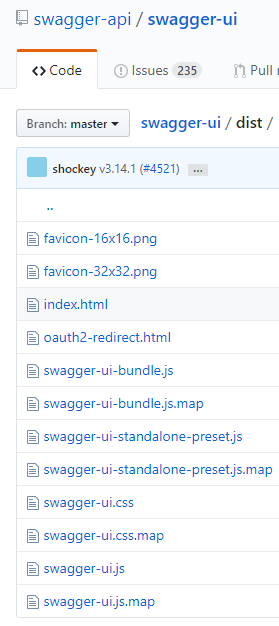
For you to produce a page containing a Swagger documentation you need the Swagger UI distribution files.
These files you can find in the github swagger-api / swagger-ui repository.
https://github.com/swagger-api/swagger-ui/tree/master/dist
The Deploy folder of this repository has one folder for each family of the specification, with the Swagger UI files, and one folder with Scalar, an alternative interface distributed in two files:
| Folder | Document | Interface |
|---|---|---|
Deploy\Swagger2 |
swagger.json, generated by the SampleApi demo | Swagger UI 3.3.1 |
Deploy\Swagger2-Scalar |
the swagger.json of Deploy\Swagger2 |
Scalar 1.72.1 |
Deploy\OpenApi3 |
openapi.json, generated by the SampleOpenApi3 demo | Swagger UI 5.32.15 |
Deploy\OpenApi3-Scalar |
the openapi.json of Deploy\OpenApi3 |
Scalar 1.72.1 |
Both interfaces read the same document, so you can publish the two and let the reader choose, or keep only the folder of the one you prefer. Neither of them covers the whole OpenAPI 3.2 specification yet, and they do not cover the same part of it: Swagger UI 5.32.15 renders the callbacks and the response links, which Scalar does not, and Scalar 1.72.1 renders the webhooks and the hierarchy of the tags, which Swagger UI does not. The QUERY method, the querystring parameters and the cookie parameters are rendered by both, and the operations declared under additionalOperations by neither. Scalar also reads Swagger 2.0 documents, which it converts to OpenAPI 3.1 while it loads.
Swagger UI renders OpenAPI 3.2 documents starting from its 5.x releases, so an OpenAPI 3 document is published with the files of Deploy\OpenApi3 (or a newer 5.x release) or with Scalar. The page of Deploy\OpenApi3 hides the Swagger top bar (logo and Explore) and opens with the dark theme; the original light bulb button of Swagger UI, in the top right corner, switches to the light theme, the browser remembers the choice and index.html?theme=light or ?theme=dark selects a theme for one visit. The Scalar pages also open with the dark theme, changed by the switch at the bottom of the sidebar. The readme.txt file of each folder describes its files, how to point the page to your document and what that interface renders.
First you need to download the swagger user interface files and generate the swagger.json or openapi.json file. You then need to change the index.html file (or the swagger-initializer.js file in the recent distributions) to indicate the relative path of the location where the generated file is located on your web server that is hosting the swagger user interface files.
See an example below.
