


SNMP trap → messaging bridge. HoloNet is a small, self-hosted NMS that receives SNMP traps from network devices (initial target: Sophos SFVH / SFOS), classifies each event into a priority level with a user-editable rule engine, applies flood control, and sends notifications to the channels you configure: Telegram, WhatsApp (a self-hosted gateway or the Green-API cloud), generic webhooks, and anything else Shoutrrr supports.
It ships as a single Go binary with an embedded React console and pure-Go SQLite,
packaged as a FROM scratch Docker image.

- Features
- Screenshots
- Architecture
- Requirements
- Installation
- Configuration
- Usage
- Notification channels
- Configuring the Sophos firewall
- API reference
- Prometheus metrics
- Security
- Troubleshooting
- Development
- Contributing
- License
- Trap sink for SNMPv2c and SNMPv3 (authNoPriv / authPriv) on a single
UDP socket (default
0.0.0.0:1162). The listener is recover-guarded, so a malformed packet cannot crash the process. Traps with an unknown community are dropped and counted. SNMPv1 traps are ignored.- SNMPv3 auth protocols:
MD5,SHA,SHA224,SHA256,SHA384,SHA512. - SNMPv3 privacy protocols:
DES,AES,AES192,AES256,AES192C,AES256C. noAuthNoPrivusers are rejected.
- SNMPv3 auth protocols:
- OID → event decoding with an editable OID map. The RFC generic
notifications (
coldStart,warmStart,linkDown,linkUp,authenticationFailure) are seeded. Vendor OIDs such as the Sophos MIB are added by hand or mapped from the Events drawer. Unmapped traps get a configurable default severity and are flagged in the UI. - Rule engine: ordered, first-match rules that match on device, OID glob, and a regex over the event message. Rules assign a severity and route to channels, with per-severity default routes as a fallback. Rules can also continue matching or bypass flood control.
- Five built-in severity levels (Critical, High, Medium, Low, Info), each with a color and emoji. You can add your own levels.
- Flood control:
none,dedupe,rate_limit(with a "+K more" summary) anddigest(grouped rollups). You can switch strategy at runtime without a restart. - Notifications through Shoutrrr (Telegram, Discord, Slack, ntfy, email, …), WhatsApp via a self-hosted go-whatsapp-web-multidevice gateway or the Green-API cloud, and generic webhooks. Sending is concurrent and best-effort: each attempt has a 10 s timeout and failed sends get 2 retries. Each channel's result is recorded per trap as a notification row. Only failures are written to the log.
- Secrets sealed at rest: community strings, SNMPv3 passwords and channel configs are AES-256-GCM encrypted with a key derived from the master key. The API never returns them.
- Modern console: a responsive React/Vite SPA embedded in the binary. It has a sortable Events tab, drag-to-reorder rules with an inline Test (dry-run), one-click OID mapping from the Events drawer, Replay routing, live refresh (~60 s), dark/light themes and a first-run setup wizard. You can turn auth off when HoloNet sits behind Cloudflare Access.
- Prometheus metrics at
/metrics, an OpenAPI 3 spec at/api/openapi.yaml, and docs at/api/docs. - OS service support (systemd, launchd, Windows services) through
--service install|start|stop|restart|uninstall.

Click any row to see the decoded varbinds and the dispatch status for each channel. The Replay routing action runs a stored trap through the pipeline again.

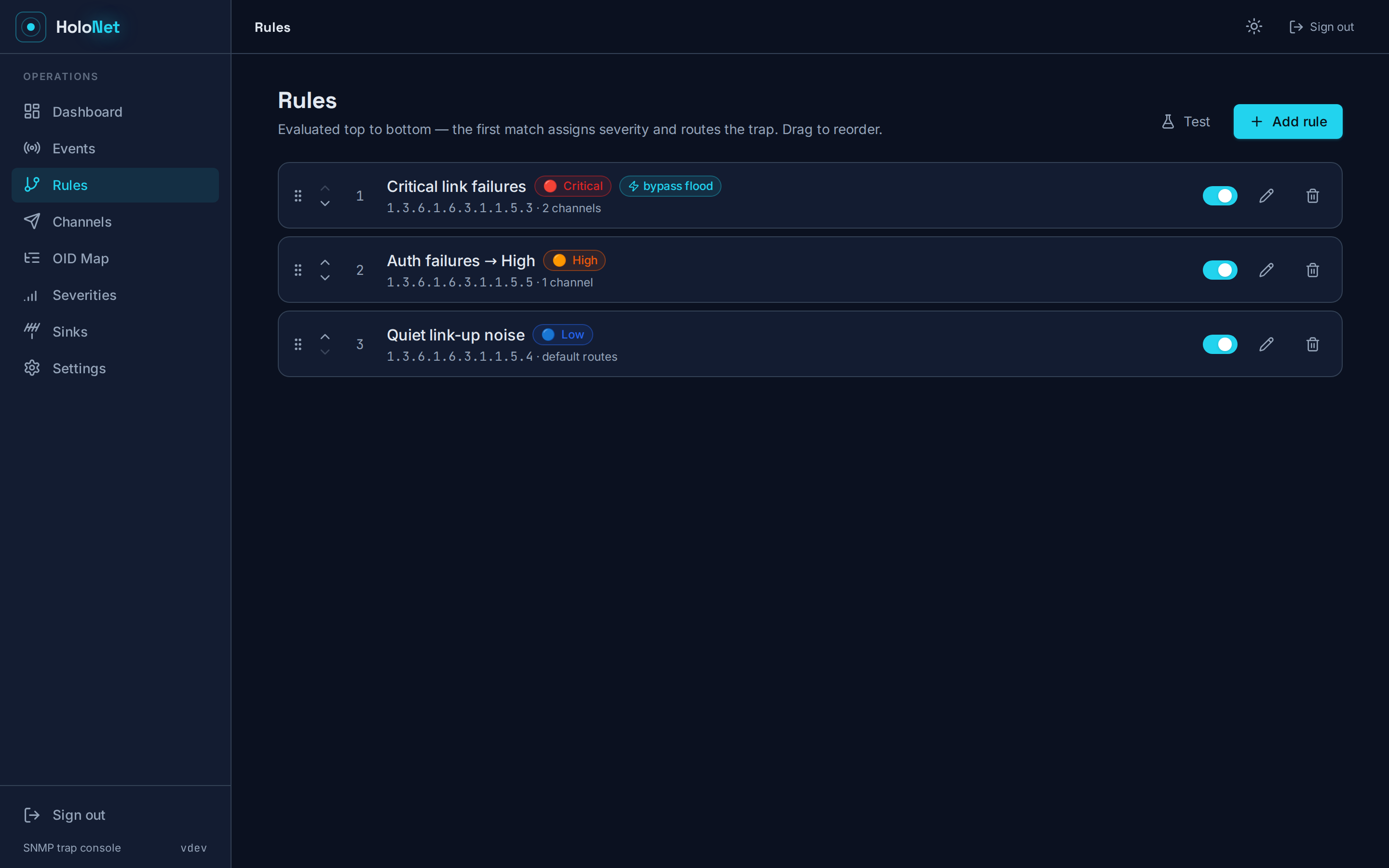
Drag rules to reorder them. Test dry-runs a sample event, so you can see which rule wins and where the event goes before you save.
Each rule can route to its own set of channels. Select any combination of channels on the rule, and a matching event goes only to those. Leave a rule's channels empty to fall back to the per-severity default routes. For example, you can send Critical firewall events to an on-call WhatsApp number while everything else goes to a Telegram ops room.

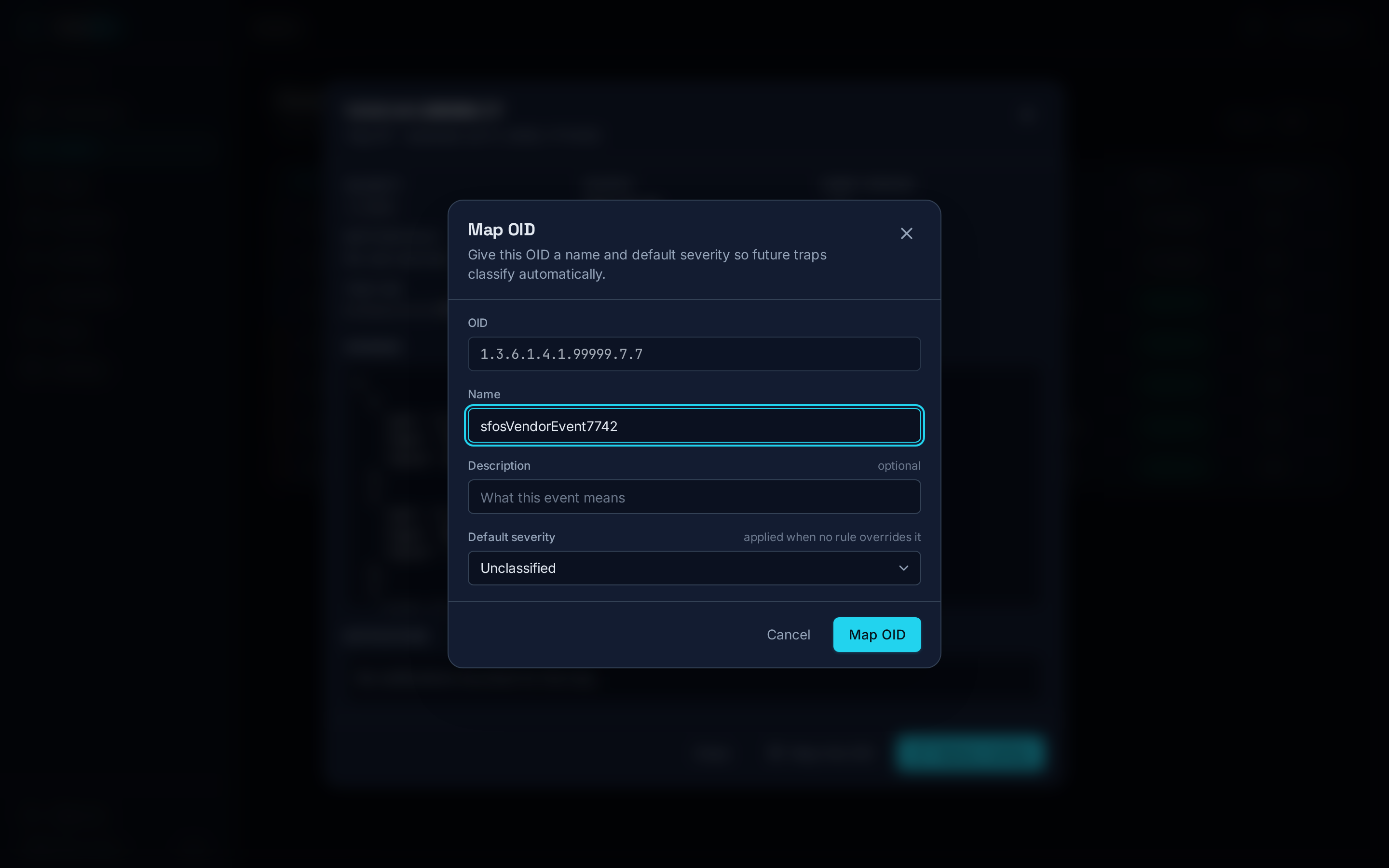
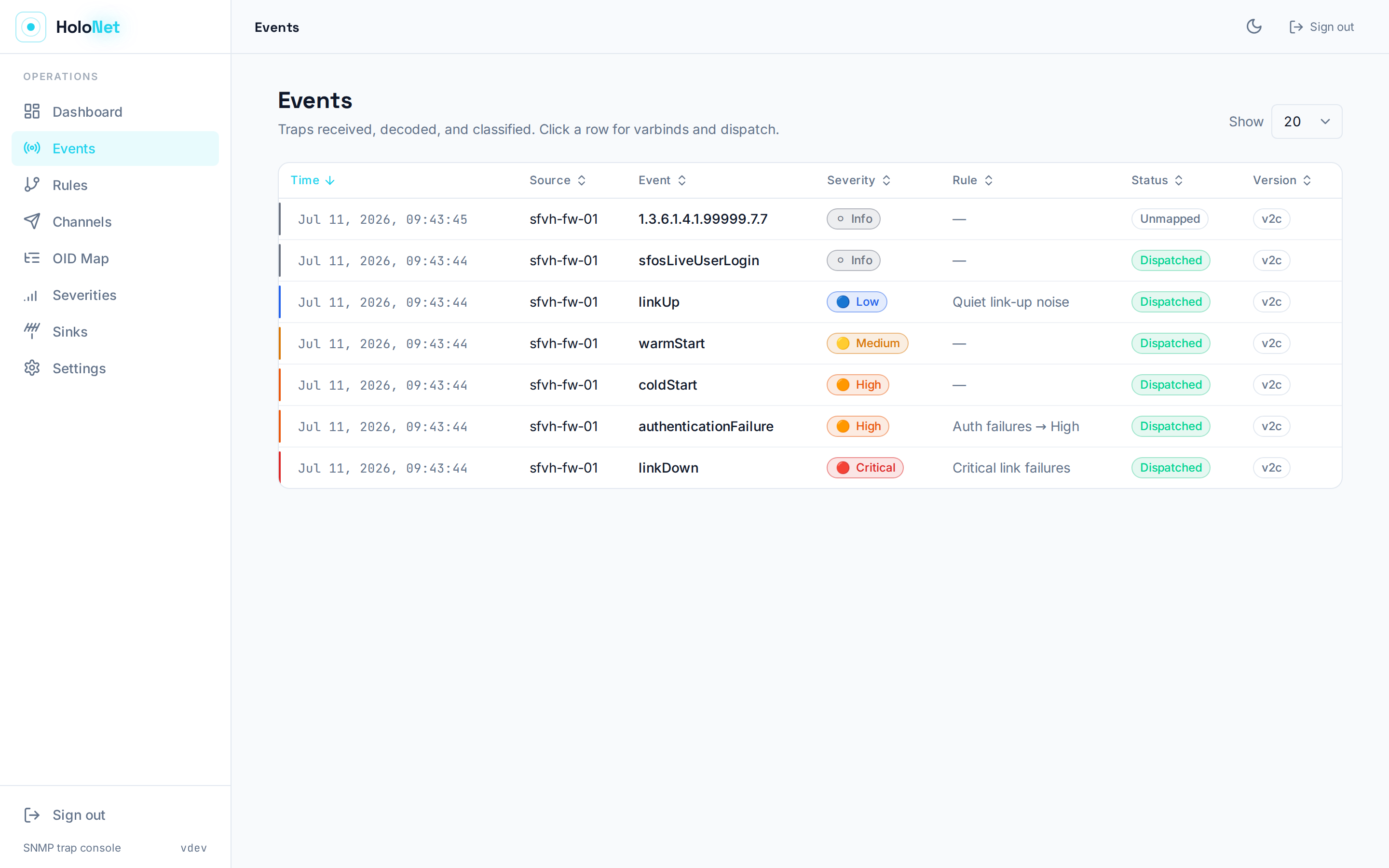
You can name unmapped OIDs on the spot from the Events drawer:

WhatsApp messages can go through the Green-API cloud.
Enter the Instance ID, the API token and the recipient phone number
(international format, digits only; a JID also works). Leave API URL blank
to use https://api.green-api.com. If the Green-API console shows a cluster
URL (e.g. https://7103.api.greenapi.com), enter that instead.


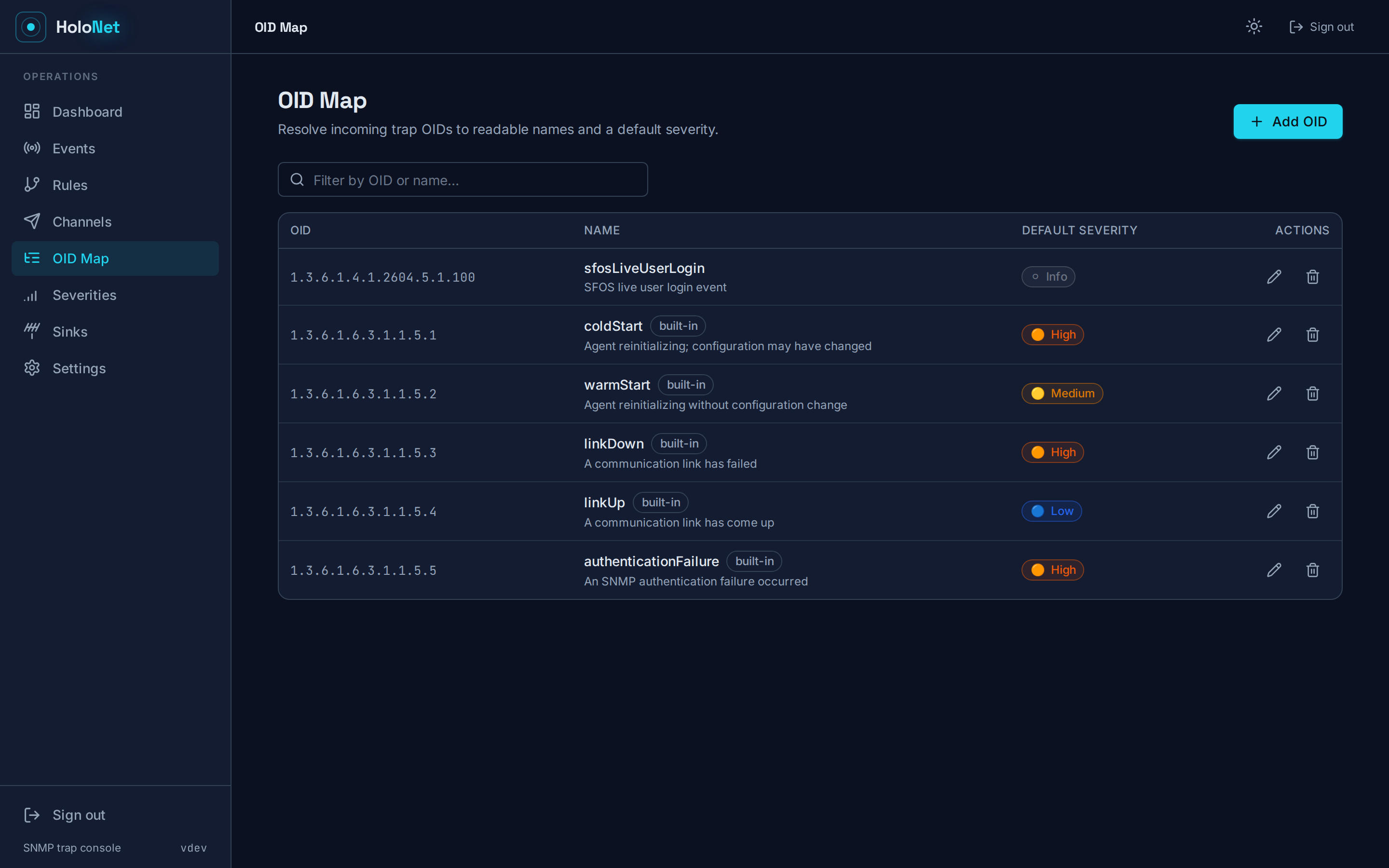


The theme follows the system preference, and the header has a toggle. On narrow screens the Events table turns into cards, and sorting still works.


flowchart LR
    dev[Network devices<br/>Sophos SFOS, …] -- "SNMP v2c / v3 traps<br/>UDP :1162" --> sink[Trap sink]
    sink --> dec[Decoder<br/>OID map]
    dec --> rules[Rule engine<br/>severity + routes]
    rules --> flood[Flood control<br/>none / dedupe / rate_limit / digest]
    flood --> disp[Dispatcher]
    disp --> sh[Shoutrrr<br/>Telegram, Slack, …]
    disp --> wa[WhatsApp gateway]
    disp --> ga[Green-API]
    disp --> wh[Webhook]
    rules -. persist .-> db[(SQLite<br/>traps, notifications, config)]
    disp -. dispatch log .-> db
    db <--> api[REST API /api/v1<br/>chi]
    api <--> spa[Embedded React console]
    api --- metrics["/metrics<br/>Prometheus"]
Pipeline: Sink → Decode → Classify → Flood control → Persist → Dispatch → Surface.
Every trap is stored, including suppressed ones. Notification rows are written as follows:
- Sent immediately: one row per channel, with status
sentorfailed. - Held for a
rate_limitsummary or adigest: a singleheldrow with no channel. - Suppressed by
dedupe: no notification row.
The rollup and digest messages sent later are not recorded as notification rows.
- One of:
- Docker (images for
linux/amd64,linux/arm64,linux/arm/v7), or - Go 1.25 and Node.js 20 to build from source.
- Docker (images for
- A master key: any non-empty string, ideally high-entropy
(
openssl rand -base64 32). It is required to start the daemon. - Network reachability from your devices to the trap port (UDP
1162by default, or162when remapped). - Credentials for the notification channels you plan to use (Telegram bot token, Green-API instance, WhatsApp gateway, webhook URL, …).
The image is published on Docker Hub as
techblog/holonet (latest and
dated YYYY.M.PATCH tags). This is the repository's
docker-compose.yml, with its comments shortened:
services:
  holonet:
    image: techblog/holonet:latest
    ports:
      - "162:1162/udp"   # host 162 → container 1162 (unprivileged inside)
      - "8080:8080"      # web UI + REST API
    environment:
      HOLONET_MASTER_KEY: ${HOLONET_MASTER_KEY}   # openssl rand -base64 32
      LOG_LEVEL: info                             # has no effect, see below
      # HOLONET_SECURE_COOKIES: "true"            # when served over TLS
    volumes:
      - holonet-data:/data   # SQLite DB + WAL; persist it
    # Optional: bind 162 directly inside the container instead of remapping.
    # cap_add: ["NET_BIND_SERVICE"]
    restart: unless-stopped
volumes:
  holonet-data:
LOG_LEVEL is not read by HoloNet, so that line has no effect. To change the
log level, use command: ["--log-level", "debug"] (see the
configuration note).
export HOLONET_MASTER_KEY="$(openssl rand -base64 32)"
docker compose up -d
# open http://localhost:8080 and complete the first-run setup wizard
The master key seals every secret at rest, so keep it stable. If you lose it, the sealed community strings, SNMPv3 passwords and channel credentials can no longer be read. It also signs session cookies, so changing it signs everyone out.
The image runs as the non-root UID 10001 and stores its database at
/data/holonet.db. Use a named volume (as above) so that /data stays writable.
docker run -d --name holonet \
  -p 162:1162/udp -p 8080:8080 \
  -e HOLONET_MASTER_KEY="$(openssl rand -base64 32)" \
  -v holonet-data:/data \
  --restart unless-stopped \
  techblog/holonet:latest
The entrypoint is the holonet binary, so extra flags go after the image name,
e.g. techblog/holonet:latest --log-level debug.
No prebuilt binaries are attached to GitHub Releases yet. Build them yourself:
git clone https://github.com/t0mer/Holonet.git && cd Holonet
# frontend (Vite writes straight into internal/webui/dist, which is embedded)
cd web && npm ci && npm run build && cd ..
# backend + tests
go test ./...
# single binary with the UI embedded
CGO_ENABLED=0 go build -o holonet ./cmd/holonet
./holonet --master-key "$(openssl rand -base64 32)" --db-path ./holonet.db
CGO_ENABLED=0 works throughout because SQLite is pure Go, so the binaries
cross-compile cleanly. scripts/build.sh builds the frontend (unless
SKIP_FRONTEND=1 is set) and cross-compiles the full matrix into dist/:
Linux amd64/arm64/armv7/armv6/386, macOS amd64/arm64, and Windows
amd64/arm64. Set VERSION=… to stamp the build.
If you skip the frontend build, the binary still compiles and serves the API,
but it embeds only a .gitkeep placeholder. / then shows a directory listing
instead of the console.
--service install registers HoloNet with the OS service manager (systemd,
launchd, Windows services, …). The flags you pass alongside it are baked into
the unit:
sudo holonet --service install --db-path /var/lib/holonet/holonet.db \
  --http-addr :8080 --master-key "$HOLONET_MASTER_KEY"
sudo holonet --service start
The installed unit always gets --db-path, --http-addr and --log-level,
plus --secure-cookies and --master-key when they are set. If you pass the
master key as a flag, it ends up in the unit's ExecStart. The key is also baked in when it comes from the environment: if
HOLONET_MASTER_KEY is exported in the shell that runs --service install, it
is written into the unit as --master-key. To keep it out of the unit file,
install without --master-key and with HOLONET_MASTER_KEY unset (e.g.
env -u HOLONET_MASTER_KEY holonet --service install …). Then set
HOLONET_MASTER_KEY in the service environment instead (e.g. a systemd drop-in
or /etc/sysconfig/holonet). Other actions are stop, restart and uninstall.
Only bootstrap values come from flags or the environment. Everything operational lives in SQLite and is managed from the UI/API: communities, SNMPv3 users, devices, severities, OID map, channels, rules, default routes, flood strategy and the SNMP bind address.
| Flag | Env | Default | Purpose |
|---|---|---|---|
--master-key |
HOLONET_MASTER_KEY |
(required) | Key for AES-256-GCM sealing of secrets. Also used to derive the session-cookie signing key |
--db-path |
HOLONET_DB_PATH ¹ |
/data/holonet.db |
SQLite database file (WAL mode) |
--http-addr |
HOLONET_HTTP_ADDR ¹ |
:8080 |
Web UI / API listen address |
--log-level |
HOLONET_LOG_LEVEL ¹ |
info |
debug / info / warning / error. debug also logs gosnmp's internal decode/USM output |
--secure-cookies |
HOLONET_SECURE_COOKIES |
false |
Set the Secure flag on session cookies (enable behind TLS) |
--service <action> |
install / uninstall / start / stop / restart the OS service, then exit |
||
--reset-password |
Interactively reset the admin password (needs a TTY), then exit | ||
--add-community <string> |
Seal and insert an SNMPv2c community, then exit (scripting helper) | ||
--add-shoutrrr <name=url> |
Seal and insert a Shoutrrr channel, then exit (scripting helper) | ||
--version |
Print the version and exit | ||
--help |
Show usage |
Precedence: a flag you set explicitly wins over the environment, which wins over the built-in default.
¹ In the current code, HOLONET_DB_PATH, HOLONET_HTTP_ADDR and
HOLONET_LOG_LEVEL are not applied: the flag's default value always takes
priority over them. Use the flags instead. In Docker, append them after the
image name, or use command: in Compose, e.g.
command: ["--log-level", "debug"]. HOLONET_MASTER_KEY works as expected.
HOLONET_SECURE_COOKIES is combined with the flag using OR, so
--secure-cookies=false cannot override HOLONET_SECURE_COOKIES=true.
These settings are edited on the Sinks and Settings pages, or through
PUT /api/v1/settings. The API only accepts the keys below.
| Key | Default | Description |
|---|---|---|
snmp.bind_addr |
0.0.0.0:1162 |
UDP host:port the trap sink binds to. Applied at startup, so restart after changing it |
flood.strategy |
none |
none, dedupe, rate_limit or digest |
flood.dedupe_window |
30s |
dedupe: suppress repeats of the same source + OID within this window |
flood.rate_n |
5 |
rate_limit: max notifications per key per window |
flood.rate_window |
1m |
rate_limit: window length |
flood.digest_interval |
5m |
digest: how often the grouped digest is sent |
unknown_default_severity_id |
ID of Info |
Severity given to traps whose OID isn't in the OID map |
auth.enabled |
true |
Set to false to turn off console/API sign-in (only behind an authenticating proxy such as Cloudflare Access) |
Durations use Go syntax (30s, 1m, 5m). Flood-control changes apply
immediately. Communities, SNMPv3 users and the bind address are loaded when
the daemon starts, so restart HoloNet after changing them.
- Start HoloNet and open
http://<host>:8080. - The setup wizard creates the single admin account (password of at least 8 characters).
- On Sinks, add a v2c community and/or an SNMPv3 user, then restart HoloNet so the sink loads them.
- On Channels, add at least one channel and use Send test to check it.
- Create Rules that route to your channels, and/or set per-severity
default routes through the API (
PUT /api/v1/routes/{severityID}). The console has no editor for default routes yet. - Point your devices' trap destination at the HoloNet host and port, then watch Events.
| Page | What it does |
|---|---|
| Dashboard | Trap totals, counts per severity, notification counts, and the 10 most recent events |
| Events | Sortable trap list (time, source, event, severity, matched rule, status). The drawer shows varbinds, per-channel dispatch results, Replay routing, and a quick Map action for unmapped OIDs |
| Rules | Create, edit, enable/disable and drag-reorder rules. Test dry-runs a sample source IP / trap OID / message without storing or sending anything |
| Channels | Add Shoutrrr, WhatsApp, Green-API or webhook channels, toggle them, and send a real test message (also before saving) |
| OID Map | Name trap OIDs and give them a default severity |
| Severities | Edit the built-in levels or add your own (name, rank, color, emoji) |
| Sinks | Trap listener bind address, v2c communities and SNMPv3 users |
| Settings | Flood control, the default severity for unknown events, and whether sign-in is required |
Two things are managed only through the API, because the console has no page for them yet:
- Devices (source IP → friendly name), used to match rules and label
events:
/api/v1/devices. - Per-severity default routes:
GET /api/v1/routesandPUT /api/v1/routes/{severityID}.
Rules are evaluated in order, and disabled rules are skipped. A rule matches when all of its conditions hold:
| Field | Meaning |
|---|---|
match_device_id |
Only traps from this device (source IP). Empty = any device |
match_oid_glob |
Glob on the trap OID, e.g. 1.3.6.1.4.1.2604.*. * or empty = any |
match_varbind_regex |
Go regular expression matched against the composed event message |
severity_id |
Severity assigned by the first matching rule. Empty = keep the OID-map default |
channel_ids |
Channels to notify. Empty = the default routes of the resolved severity |
continue_on_match |
Keep evaluating later rules; their channels are added to the set |
bypass_flood_control |
Always send immediately, whatever the flood strategy |
When no rule matches, the event takes the OID map's default severity and goes to that severity's default routes.
Five levels are seeded: Critical 🔴, High 🟠, Medium 🟡, Low 🔵
and Info ⚪. Rank 1 is the most severe. Each level has a set of default
routes (PUT /api/v1/routes/{severityID}).
Flood control groups events by source IP + trap OID.
| Strategy | Behaviour |
|---|---|
none |
Every event is sent |
dedupe |
Repeats within flood.dedupe_window are stored and counted, but not sent |
rate_limit |
Up to flood.rate_n events per key per flood.rate_window are sent. The rest are held and sent as one "+K more" summary when the window closes |
digest |
All events are held and sent as a grouped digest every flood.digest_interval |
Rules with bypass_flood_control always skip these strategies.
Messages are plain text:
<emoji> [<Severity>] <event name>, then the message body and the
Source, OID and Time fields.
| Kind | Config fields | Notes |
|---|---|---|
shoutrrr |
url |
Any Shoutrrr service URL. Examples: telegram://token@telegram?chats=@channel, slack://…, discord://…, ntfy://…, smtp://… |
whatsapp |
base_url, recipient, endpoint (default /send/message), username/password (basic auth) or token (bearer) |
Self-hosted go-whatsapp-web-multidevice gateway. Posts {"phone", "message"} |
greenapi |
instance_id, token, recipient, api_url (optional) |
Calls POST {api_url}/waInstance{id}/sendMessage/{token}. @c.us is added to the recipient when it contains no @. All fields are trimmed |
webhook |
url, method (default POST), headers, body_template |
Without a template, sends JSON {title, body, severity, emoji, fields}. With a template, sends the rendered Go text/template (over the message) as application/json |
Telegram is supported through Shoutrrr's telegram:// scheme.
Channel configs are write-only. The API lists name, kind and enabled state, but
never the config. When you update a channel, an empty or null config keeps the
sealed value.
- SNMP agent: in Administration → SNMP, enable the agent, then add a
v2c community and/or an SNMPv3 user. Auth is required: authNoPriv
at minimum, authPriv recommended. HoloNet rejects
noAuthNoPriv. - Zone access: in Administration → Device access, allow SNMP for the zone the firewall will send from.
- Trap destination: in System services → Notification list (or the SNMP trap settings), enable SNMP traps for the events you care about and point the trap destination at the HoloNet host and port.
- In HoloNet, add the matching community (Sinks → Add community) or v3 user (Sinks → Add user), restart HoloNet, and watch the Events tab.
Sophos enterprise OIDs are not hardcoded. Map them from your firewall's MIB:
- On the firewall's SNMP page, click Download MIB.
- Translate the MIB to name/OID pairs, e.g.:
snmptranslate -Td -Ln -m ./SFOS-FIREWALL-MIB.txt -M +. -On <oid> ...
# or dump the tree:
snmptranslate -Tz -m ./SFOS-FIREWALL-MIB.txt
- Add the entries under OID Map (name, description, default severity), or map unmapped OIDs from the Events tab as they arrive. The older Astaro/UTM line encoded severity into the OID structure. SFOS uses its own MIB layout, so map each entry deliberately rather than assuming a pattern.
There is no automatic MIB importer. POST /api/v1/oidmap makes bulk loading
easy to script.
The REST API lives under /api/v1, and every console action maps to an
endpoint. The OpenAPI 3 spec is at /api/openapi.yaml, and /api/docs
is a short page that links to it.
Authentication: a signed, HttpOnly session cookie (holonet_session, valid
for 24 h). POST /api/v1/auth/setup issues it on first run, and
POST /api/v1/auth/login issues it after that. If auth.enabled is false,
the protected routes are open.
curl -c cookies.txt -H 'Content-Type: application/json' \
  -d '{"username":"admin","password":"…"}' http://localhost:8080/api/v1/auth/login
curl -b cookies.txt 'http://localhost:8080/api/v1/traps?sort=severity&order=asc&limit=50'| Method | Path | Auth | Purpose |
|---|---|---|---|
| GET | /health |
no | {"status":"ok","version":…} |
| GET | /metrics |
no | Prometheus metrics |
| GET | /api/openapi.yaml, /api/docs |
no | API spec and docs page |
| GET | /api/v1/auth/status |
no | configured, auth_enabled, authenticated |
| POST | /api/v1/auth/setup |
no | Create the admin (only once) |
| POST | /api/v1/auth/login / /api/v1/auth/logout |
no | Sign in / out |
| GET, PUT | /api/v1/settings |
yes | Read / update allow-listed settings ({"key":"value"}) |
| GET | /api/v1/dashboard |
yes | Totals, per-severity counts, recent traps |
| GET, POST, PUT, DELETE | /api/v1/severities[/{id}] |
yes | Severity levels |
| GET, POST, PUT, DELETE | /api/v1/oidmap[/{id}] |
yes | OID map |
| GET, POST, PUT, DELETE | /api/v1/devices[/{id}] |
yes | Devices (source_ip, name, enabled) |
| GET, POST, PUT, DELETE | /api/v1/channels[/{id}] |
yes | Channels (name, kind, enabled, config) |
| GET, POST, PUT, DELETE | /api/v1/rules[/{id}] |
yes | Rules |
| PUT | /api/v1/rules/reorder |
yes | Set rule order |
| POST | /api/v1/rules/test |
yes | Dry-run {"source_ip","trap_oid","message"} |
| GET | /api/v1/routes |
yes | Default routes per severity |
| PUT | /api/v1/routes/{severityID} |
yes | Set a severity's default channels ({"channel_ids":[…]}) |
| GET, POST, PUT, DELETE | /api/v1/sinks/communities[/{id}] |
yes | SNMPv2c communities (write-only secret) |
| GET, POST, PUT, DELETE | /api/v1/sinks/v3users[/{id}] |
yes | SNMPv3 users (write-only passwords) |
| GET | /api/v1/traps |
yes | List traps. sort = received_at, source_ip, resolved_name, severity, matched_rule, status or id; order = asc or desc; limit (default 20, max 500) |
| GET | /api/v1/traps/{id} |
yes | One trap with varbinds |
| GET | /api/v1/traps/{id}/notifications |
yes | Per-channel dispatch records |
| POST | /api/v1/replay/{id} |
yes | Re-run a stored trap through the pipeline. This stores a new trap and sends notifications |
| POST | /api/v1/test/{id} |
yes | Send a test message through a saved channel |
| POST | /api/v1/test |
yes | Send a test through an unsaved config ({"kind","config"}) |
/metrics uses the holonet_ namespace and also exposes the Go runtime and
process metrics.
| Metric | Labels | Description |
|---|---|---|
holonet_traps_received_total |
version, source |
Traps accepted by the sink |
holonet_traps_suppressed_total |
strategy |
Traps suppressed or held by flood control |
holonet_notifications_total |
channel, status |
Notification dispatch results |
holonet_trap_auth_failures_total |
Traps dropped for an unknown community | |
holonet_trap_decode_panics_total |
Recovered panics while decoding traps | |
holonet_active_channels |
Enabled notification channels (set once at startup) |
- Secrets (community strings, SNMPv3 auth/priv passwords, channel configs) are AES-256-GCM sealed with a key derived from the master key, and the API never returns them. Keep the master key out of source control and back it up together with the database volume.
- SNMPv3 requires authentication, and
noAuthNoPrivis refused. PreferauthPrivwith SHA-2/AES. SNMPv2c community strings travel in clear text, so keep v2c traffic on trusted networks. - The console uses a single bcrypt-hashed admin account and an HMAC-signed,
HttpOnly,
SameSite=Laxsession cookie. Put HoloNet behind TLS (reverse proxy) and set--secure-cookies. - Finish the first-run setup before you expose the port: until an admin exists, anyone who can reach the UI can create one.
auth.enabled=falseopens the whole API. Only use it behind an authenticating proxy such as Cloudflare Access./metricsand/healthhave no authentication. Restrict them at the network or proxy layer.- The settings API only accepts a fixed allow-list of keys.
- There is no built-in login rate limiting. If the console is reachable from untrusted networks, add rate limiting at the proxy.
| Symptom | Cause / fix |
|---|---|
master key is required: set --master-key or HOLONET_MASTER_KEY |
Set the master key (see Configuration) |
Log: no enabled v2c communities configured; all v2c traps will be dropped |
Add a community on Sinks, then restart |
Log: dropping v2c trap with unknown community |
The device's community doesn't match. Communities are loaded at startup, so restart after adding one |
Log: skipping community … failed to unseal (wrong master key?) |
The master key changed since the secret was saved. Restore the original key or re-enter the secret |
| SNMPv3 traps never arrive | Check the user, protocols, passphrases and engine ID. Run with --log-level debug to see gosnmp's USM/decrypt errors. Restart after adding users |
| SNMPv1 traps are ignored | Only v2c and v3 are supported. Configure the device to send v2c or v3 |
Log: trap stored but no enabled channels routed |
No rule channels and no default routes for that severity. Add channels to the rule, or set default routes with PUT /api/v1/routes/{severityID} |
| Bind error on the trap port | Something else uses the port, or you need privileges for ports below 1024. The default compose file maps host 162 to container 1162. The compose file also has a commented-out cap_add: ["NET_BIND_SERVICE"] for binding 162 directly. Changes to snmp.bind_addr need a restart |
| Forgot the admin password | holonet --reset-password (needs a TTY). In Docker: docker exec -it <container> /holonet --reset-password |
/ shows a directory listing (only .gitkeep) instead of the console after a source build |
The frontend wasn't built. Run npm ci && npm run build in web/ before go build |
| Env var for DB path / HTTP address / log level has no effect | Known limitation, see note ¹ under Configuration. Use the flags |
The database has no automatic trap retention, so it grows with trap volume. Keep
an eye on the size of the /data volume.
# backend
go test ./...
go run ./cmd/holonet --master-key dev --db-path ./dev.db --log-level debug

# frontend with hot reload (proxies /api and /health to :8080)
cd web && npm ci && npm run dev
Project layout:
cmd/holonet/          # daemon entrypoint, service wiring, admin one-shots
internal/api/         # chi REST API, OpenAPI spec, SPA handler
internal/auth/        # admin auth, signed session cookies
internal/config/      # bootstrap flags/env (pflag + viper)
internal/crypto/      # AES-256-GCM sealer
internal/decode/      # OID → event decoding
internal/flood/       # flood-control strategies
internal/metrics/     # Prometheus collectors
internal/notify/      # Shoutrrr, WhatsApp, Green-API, webhook + dispatcher
internal/pipeline/    # decode → classify → flood → persist → dispatch
internal/rules/       # rule engine
internal/snmp/        # v2c/v3 trap sink (gosnmp)
internal/store/       # SQLite store + embedded migrations
internal/version/     # build-injected version
internal/webui/       # go:embed of the built SPA (dist/)
web/                  # React + Vite + Tailwind console
scripts/              # build.sh (release matrix), next-version.sh
Versioning is date-based (YYYY.M.PATCH) and is injected with
-ldflags "-X github.com/t0mer/holonet/internal/version.Version=<v>".
CI workflows (all run manually with workflow_dispatch):
- Release (
release.yml): builds all targets, tags, and creates a GitHub Release. It triggers Docker when it finishes. - Docker (
docker.yml): multi-arch image (linux/amd64,linux/arm64,linux/arm/v7) pushed totechblog/holonet. Standalone runs auto-increment the version tag. - Publish to GHCR (
publish-ghcr.yml): pushesghcr.io/t0mer/holonet. No GHCR image has been published yet.
Issues and pull requests are welcome. Please:
- Open an issue first for larger changes.
- Keep
go test ./...passing and runnpm run buildinweb/for UI changes. - Keep one logical change per commit, and match the existing code style.
Licensed under the Apache License 2.0.