
The Puppet Master for Embedded Target Boards


HW Puppet (hw-puppet) is a standalone, open-source Hardware-in-the-Loop (HIL) automation bridge and test harness.
Built on MicroPython (v1.29.0) with a custom TinyUSB Dual-CDC stack. Flash the firmware onto an off-the-shelf ESP32-S3-DevKitC-1 development board, and it immediately becomes a dedicated HW Puppet device that "pulls the strings" on your target embedded boards: controlling hardware lines (RESET, RECOVERY/BOOT, POWER relay, GPIOs) and streaming high-speed UART consoles over a single physical USB Type-C connection.
Designed to pair seamlessly with ae-hw-bridge (the host FastMCP gateway that connects physical boards to AI coding agents like Claude, Cursor, and Agents Engine), or run completely standalone with CLI scripts and CI/CD pipelines.
📦 Precompiled Binaries: Ready-to-flash firmware is available on the Releases page.
Note
Execution Context for Developers & AI Agents:
hw-puppet is firmware running inside the ESP32-S3 microcontroller, not a host Python package (pip install hw_puppet does not exist).
To interact with the device from your host computer (Python scripts, tests, AI coding agents):
- AI Agents & MCP: Use
ae-hw-bridge(the official host FastMCP gateway). - Host Python Scripts: Send MicroPython code over CDC 0 Raw REPL (see
examples/host_client.py). - For LLMs & AI Coding Tools: See
llms.txtfor quick machine-readable API contracts and guidelines.
[ Host Machine (PC / CI / Test Runner / AI Agent) ]
                      │
                      │ Single USB-C Cable (Native USB OTG)
                      ▼
             ┌─────────────────┐
             │    HW-PUPPET    │ (ESP32-S3 @ MicroPython v1.29.0 + TinyUSB)
             │                 │
             │  ┌───────────┐  │
             │  │   CDC 0   │  │ Control Channel (/dev/ttyACM0 or /dev/serial/by-id/...)
             │  │ (Raw REPL)│  │ -> Zero-flash RAM execution for pin manipulation
             │  └─────┬─────┘  │
             │        │        │
             │  ┌─────┴─────┐  │
             │  │   CDC 1   │  │ UART Console Bridge (/dev/ttyACM1 or /dev/serial/by-id/...)
             │  │(Raw Bridge│  │ -> Transparent hardware UART up to 921600+ baud
             │  └─────┬─────┘  │
             └────────┼────────┘
                      │
        ┌─────────────┴─────────────┐
        ▼                           ▼
  [ Control Lines ]          [ Target Console ]
  (RESET, RECOVERY,          (TX / RX @ 115200..921600)
   POWER RELAY, GPIO)               │
        │                           │
        └─────────────┬─────────────┘
                      ▼
          [ Target Dev Board (DUT) ]
   (NVIDIA Jetson, Raspberry Pi, STM32, NXP, etc.)
- Single Physical Connection: A single USB Type-C cable powers the ESP32-S3 and provides both control and data paths.
- USB Composite Device (Dual CDC): Powered by custom TinyUSB descriptors:
- CDC 0 (
/dev/hw-puppet-control//dev/ttyACM0): MicroPython REPL (115200 baud). Host executes scripts directly in RAM using zero-flash Raw REPL RPC. - CDC 1 (
/dev/hw-puppet-uart//dev/ttyACM1): Transparent hardware UART bridge connected to the target console (default 115200 baud, configurable up to 921600+).
- CDC 0 (
- Standard Hardware Control: Native
machine.Pin,machine.Timer,neopixel(WS2812 status LED), andPin.irqwithout custom driver lock-in. - On-Device Hardware Pattern Matcher: Real-time C-level pattern detection and microsecond-level auto-reply directly on Core 0 (
uart_bridge.wait_for,uart_bridge.arm_match). - Completely Framework-Agnostic: Works with any language,
pytest, bash scripts,minicom/tio, CI/CD pipelines, or agentic tool frameworks (MCP).
To avoid confusion across tools, build scripts, USB descriptors, and udev rules, the project uses the following standardized naming conventions:
| Context / Layer | Identifier / Variation | Description |
|---|---|---|
| Human-Readable Name | HW Puppet / HWPuppet | Official project and hardware harness title |
| Repository & CLI | hw-puppet |
Git repository name, folder naming, command prefix |
| Firmware Board Target | HW_PUPPET |
MicroPython CMake board name (BOARD=HW_PUPPET), folder firmware/boards/HW_PUPPET/ |
| USB Manufacturer | HW-Puppet |
USB Device Descriptor manufacturer string (0x303a:0x4002) |
| USB Product Name | HW-PUPPET |
USB Device Descriptor product string |
| USB CDC 0 Interface | HW-PUPPET REPL |
Primary control & MicroPython Raw REPL interface string |
| USB CDC 1 Interface | HW-PUPPET UART Bridge |
Secondary high-speed UART console stream interface string |
| Linux Udev Permissions | MODE="0666" |
Read/write access for non-root users on both CDC channels |
| Hardware Badge | hw_puppet.set_badge("name") |
Persistent identifier in ESP-IDF NVS surviving reboots & LittleFS formats |
| Python / C Packages | hw_puppet, hw_puppet.uart_bridge |
Root namespace package (import hw_puppet) and bridge submodule |
hw-puppet runs on the Espressif ESP32-S3 microcontroller series featuring native USB OTG peripheral support.
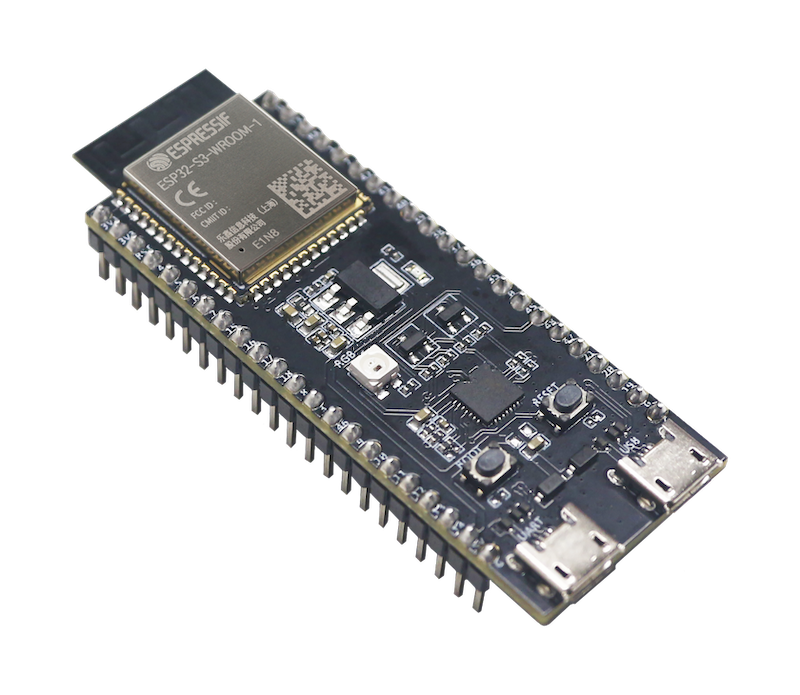
- Module: ESP32-S3-WROOM-1 / ESP32-S3-WROOM-1U (PCB antenna or external IPEX connector).
- Memory Configuration: N8R8 or N16R8 (8MB/16MB Quad-SPI Flash + 8MB Octal-SPI PSRAM).
- Processor: Dual-core Xtensa® 32-bit LX7 @ up to 240 MHz.
- USB: Hardware USB 1.1 Full-Speed OTG PHY.
- Reference Development Board: ESP32-S3-DevKitC-1 (Espressif Systems) or any pin-compatible dual Type-C clone board.
- Documentation & Schematics: Espressif ESP32-S3-DevKitC-1 User Guide
The recommended dev boards feature two distinct USB Type-C receptacles:
| Port Label on Board | Hardware Interface | Role in hw-puppet |
|---|---|---|
USB (Native USB OTG) |
ESP32-S3 internal USB PHY (GPIO 19 = D-, GPIO 20 = D+) |
Primary operational connection. Hosts the TinyUSB Dual CDC stack: CDC 0 (MicroPython Raw REPL RPC) + CDC 1 (Transparent UART Bridge). Connect your host machine or CI runner here. |
UART (USB-to-Serial) |
On-board CP2102 / CH343 / CH9102 converter | Flashing & low-level debug port. Used for flashing initial bootloader & firmware images via esptool.py. |
The firmware reserves only the hardware UART peripheral lines for the transparent console bridge. All other GPIO pins remain completely free and dynamically configurable via standard MicroPython machine.Pin:
| ESP32-S3 Pin | Function | Target / DUT Connection | Description |
|---|---|---|---|
| GPIO 43 | UART1 TX | Target RX | Serial command TX to target console (115200..921600 baud) |
| GPIO 44 | UART1 RX | Target TX | Serial log RX from target console (115200..921600 baud) |
| GND | Ground | Target GND | Common reference ground (mandatory) |
Note
All other ESP32-S3 pins (relays, reset lines, recovery/boot mode, power switches, I2C, SPI) are controlled dynamically from host scripts or target modules without firmware recompilation.
Warning
Target Logic Voltage Compatibility (3.3V vs 1.8V vs 5V):
- Native 3.3V I/O: ESP32-S3 GPIO pins (including UART TX/RX) operate at 3.3V LVCMOS logic levels and are NOT 5V tolerant.
- 1.8V Targets (e.g. Jetson raw SoC headers, FPGAs, mobile SoCs): Connecting 3.3V directly to 1.8V I/O pins will permanently damage the target SoC! Always verify target debug UART voltage and use a bidirectional logic level shifter (e.g. TXS0108 / PCA9306) or 1.8V-buffered debug header.
- 5V Targets: Require level shifting (e.g. resistive divider or buffer on RX) to protect ESP32-S3 inputs from overvoltage.
- Relay Isolation: Using onboard dry-contact relays for RESET, RECOVERY, and POWER lines provides galvanic isolation, making relay-based control safe regardless of target voltage levels.
In multi-board test setups or HIL racks, Linux assigns dynamic /dev/ttyACM* port numbers depending on USB hub enumeration order. To uniquely identify each board without relying on volatile port numbers or conflicting udev symlinks, hw-puppet supports persistent hardware badges stored directly in the ESP32-S3 Non-Volatile Storage (NVS).
A badge is a permanent label (e.g. jetson-bench, stm32-tester) that survives reboots, power cycles, and LittleFS filesystem wipes.
import hw_puppet

# Inspect platform version, build metadata, and active badge:
print(f"HW-PUPPET: v{hw_puppet.__version__}")
print(hw_puppet.info())

# Set persistent hardware badge in NVS:
hw_puppet.set_badge("jetson-bench")

# Query active badge:
print("Board badge:", hw_puppet.get_badge())
See docs/badge_api.md for the complete Hardware Badge reference.
To eliminate the 10–50 ms USB-roundtrip latency when synchronizing with target boot sequences (e.g. stopping U-Boot autoboot in a 1-second window), hw-puppet implements an on-the-fly streaming KMP matcher in native C on Core 0.
Bytes from UART1 RX are checked in
from hw_puppet import uart_bridge

# 1. Catch bootloader prompt and auto-reply with a space within microseconds:
if uart_bridge.wait_for("Hit any key to stop autoboot", reply=" ", timeout_ms=5000):
    print("Autoboot interrupted successfully on-device!")

# 2. Wait for login prompt with timeout:
if uart_bridge.wait_for("login:", timeout_ms=15000):
    print("Target reached login prompt")

# 3. Direct UART transmission:
uart_bridge.write(b"root\n")
See docs/uart_bridge_api.md for the complete UART Bridge and Pattern Matcher reference.
Configure non-root read/write access (MODE="0666") for HW-Puppet USB CDC ports:
./build.sh install-rulesConnect the ESP32-S3 USB port in download mode (hold BOOT, tap RESET, release BOOT):
esptool.py -p /dev/ttyACM0 -b 460800 write_flash 0x0 build/firmware.binAssign a unique badge name so host tools (ae-hw-bridge) identify it regardless of USB port enumeration:
./tools/badge.py --port /dev/ttyACM0 --set jetson-benchOpen CDC 1 to stream target boot logs:
./tools/monitor_target.py --port /dev/ttyACM1
# Or with any serial terminal:
tio /dev/ttyACM1Run Python scripts directly on the ESP32-S3 in RAM (zero flash wear):
./tools/run_script.py examples/jetson_reset.py --port /dev/ttyACM0
./tools/run_script.py examples/jetson_recovery.py --port /dev/ttyACM0examples/i2c_charger_bench/ is a complete bench
where HW Puppet acts as the I2C master rather than a reset-and-console
driver: the board under test has no UART at all. It reads an LTC4162-L battery
charger, a PCA9536 GPIO expander and an LM75B temperature sensor, and ships an
interactive host console alongside a ready-made
ae-hw-bridge target definition
under its targets/ directory.
It demonstrates two patterns that scale beyond a single script:
- A resident MicroPython package in
/lib/pbholding what the host cannot — a soft timer watching a button for a long press, and chip settings that must be replayed after the device resets itself. - Deployment that cannot go stale: each upload leaves a digest of its sources on the board, and the target re-uploads automatically whenever the files on disk no longer match.
- ESP-IDF v5.4+ installed and activated (
. $IDF_PATH/export.sh) - CMake & Ninja
./build.shOutput artifacts are copied to build/:
build/firmware.bin(Combined flash binary)build/bootloader.binbuild/partition-table.bin
hw-puppet/
├── build.sh                   # Unified firmware build & udev install script
├── docs/                      # Reference manuals & guides
│   ├── README.md              # Documentation index
│   ├── badge_api.md           # Persistent Hardware Badge API & NVS reference
│   └── uart_bridge_api.md     # FreeRTOS UART bridge & Pattern Matcher reference
├── firmware/                  # ESP32-S3 firmware sources
│   ├── boards/HW_PUPPET/      # Board definition, pins, TinyUSB config & board.c
│   ├── c_modules/             # Native MicroPython C modules
│   │   ├── hw_puppet/         # Metadata & NVS persistent badge driver
│   │   ├── uart_bridge/       # Transparent CDC1 <-> UART1 bridge driver
│   │   ├── pattern_matcher/   # Streaming KMP pattern engine
│   │   └── micropython.cmake  # User C modules registration
│   └── patches/               # Clean git patches for MicroPython (Dual CDC stack)
├── lib/
│   └── micropython/           # MicroPython upstream git submodule (v1.29.0)
├── tools/                     # Standalone host CLI tools
│   ├── badge.py               # Read, set, and clear persistent board badge
│   ├── run_script.py          # RAM script runner via MicroPython Raw REPL
│   └── monitor_target.py      # Target UART console monitor
├── examples/                  # Target control scripts, plus the i2c_charger_bench worked example
└── udev/                      # Linux udev rules for non-root CDC permissions
While hw-puppet functions completely standalone via raw REPL, Python scripts, or terminal emulators (tio, minicom), it is engineered as the core hardware execution engine for the ae-hw-bridge (Agents Engine Hardware Bridge) ecosystem.
ae-hw-bridge is the official host agent gateway and FastMCP server for hw-puppet:
- Single-Owner Host Daemon (
ae-hw-bridge-daemon): Prevents serial port contention by owning/dev/hw-puppet-controland/dev/hw-puppet-uart. Multiple CLI clients, test suites, and AI agent sessions connect concurrently over non-blocking Unix domain socket IPC (/tmp/ae-hw-bridge.sock). - Model Context Protocol (MCP) Interface: Exposes vetted, high-level automation tools (
send_target_command,read_target_console,wait_for_console_pattern,full_reboot,enter_recovery) directly to AI coding agents (Claude Desktop, Gemini, Cursor, OpenCode, Agents Engine). - Dynamic Target Modules (
.ae-hw-bridge/targets/): Define DUT-specific behaviors (pin mappings, reset timings, boot patterns, and login credentials) in Python without modifying the base firmware. - Onboard WS2812 Visual Telemetry: Real-time visual feedback on the ESP32-S3 RGB LED indicating current DUT state (flashing, recovery, rebooting, console ready).
# Install host gateway
pip install ae-hw-bridge

# Launch MCP server for agents
ae-hw-bridge-mcp